Showing posts with label Organization. Show all posts

06 September 2012

The Great Genealogy Clean-up

I am stuck in a rut. I feel like I have so many options and people to research that I just don't know where to focus next. So, I'm deciding to not focus on any one person and instead focus on ... everyone!

Yes, I will be cleaning out my entire database. In preparation for "The Great Genealogy Clean-up" I've read various posts that have been helpful.
  • James Tanner of Genealogy's Star posted Clean up your Genealogy Database where he talked about looking at place names to make sure there aren't duplicates. I will definitely be doing this, but probably towards the end of the process since I think the method I've come up with will solve most of the issues.
  • Tina Lyons of Gen Wish List has a whole series of posts dedicated to Cleaning up My Genealogy Database. I started using her system, and even printed out 60 pages of names! But after about 10 minutes, I knew this wasn't the method for me. Her process, however, was informative.
So, I made a plan that I think will work for me. My process is more focused on "creation" rather than "deletion." Just as a reference, as of today here's what I'm starting with:

 The Plan:

  1. Create a new database that is blank. To this database I will add people one at a time and work on updating them before moving on to the next person. RootsMagic makes this so easy because I can just drag and drop people into the new database.
  2. Only people who currently have sources associated with them or with a fact will move to the new database. If I can quickly find something to support the fact/person I will do so. Otherwise, they get left behind.
  3. To be "complete" and included in the new database all of the following must be true: A. Each fact associated with the person must have a source; B. Each source must have a complete citation, including a image of the source and transcription/translation; C. Relevant notes must be included with each citation or fact, as needed.
  4. Additionally, I will also be updating all file/folder names as I go along and scanning/filing all originals following my "Family History Filing System" (a 4 page description of my system which I've included with my physical files). I have so many original photos and documents still to scan...I know those will flesh out a lot of the facts that are missing citations.
I am starting as any new genealogist should, with myself. I'll me, my husband and kids then move on to our parents and siblings working my way back.

I'm expecting when I'm done to have far fewer people in my database, but only "real" and verified information will be recorded. I will of course keep my "old" database as a guide when I continue research. Just because great-great-grandma's birth date is not verified (yet) doesn't mean I can't use the "alleged" date as a starting point in my research. As Reagan would say, "Trust, but verified!"

29 May 2012

Cleaning up and Organizing

The Jensen family is giving me a bit of trouble, so I'm taking a break from them. I have a few records still to transcribe and I'll be sure to post them. For now, I thought It might be good to go through and organize my database and sources. I have so many files and folders that its starting to get a bit unwieldy. First, I'll go through and make sure all the files follow my new naming conventions. I'll also go though and be sure that all documents are transcribed and facts cited in the database.

In starting this process, I came across some 1900 US Census records I've collected but haven't done anything with! First up, the William G Warner Household.
Source: 1900 U.S. Census, Uinta Precinct, Weber, Utah, population schedule, Uinta Precinct, enumeration district (ED) 178, sheet 14, dwelling 224, family 224, William G Warner Household; digital images, Family Search (FamilySearch.org : downloaded 7 June 2011); FHL microfilm, 1854 reels.

Instead of transcribing items in an abstract fashion, as I have in the past, I went ahead and created a form that I just have to fill in.

So you can download the Word document for 1900 U.S. Census and fill your own information.

If you'd like to take a look at the pdf for the William G Warner Household you can download that here.

In order to make online searches easier for any family members that are researching these same lines, I'll continue to write up the "abstracts" and post them along with the images, as well as linking the pdf's. It's an extra step but well worth it, I think.

Abstract:

          Line 25. Warner, William G. Head, W, M, born Aug 1856, 43 yo, Married 21 years. Pob: Utah, father pob: England, mother pob: England. Engineer (RR), 0 mo. unemployed. Can read, can write, can speak English. Owns, Free, Farm, Farm Schedule #174.
         Line 26. -----, Minnie. Wife, W, F, born Oct 1859, 40 yo, Married 21 years. 9 children, 8 living. Pob: Utah, father pob: England, mother pob: England. Can read, can write, can speak English.
         Line 27. -----, William. Son, W, M, born Apr 1880, 20 yo, Single. Pob: Utah, father pob: Utah, mother pob: Utah. Stockhearder, unempolyed 8 months. Can read, can write, can speak English.
         Line 28. -----, Cora. Daughter, W, F, born July 1883, 16 yo, Single. Pob: Utah, father pob: Utah, mother pob: Utah. Attended school for 10 months. Can read, can write, can speak English.
         Line 29. -----, Edwin. Son, W, M, born June 1886, 13 yo, Single. Pob: Utah, father pob: Utah, mother pob: Utah. Attended school for 9 months. Can read, can write, can speak English.
         Line 30. -----, Ralph. Son, W, M, born June 1888, 11 yo, Single. Pob: Utah, father pob: Utah, mother pob: Utah. Attended school for 9 months. Can read, can write, can speak English.
         Line 31. -----, Frank. Son, W, M, born June 1891, 9 yo, Single. Pob: Utah, father pob: Utah, mother pob: Utah. Attended school for 9 months. Can read, can write, can speak English.
         Line 32. -----, Harry. Son, W, M, born June 1892, 7 yo, Single. Pob: Utah, father pob: Utah, mother pob: Utah. Attended school for 9 months. Can read, can write, can speak English.
         Line 33. -----, Homer. Son, W, M, born Dec 1896, 3 yo, Single. Pob: Utah, father pob: Utah, mother pob: Utah. Can read, can write, can speak English.


27 March 2012

How I Add Sources into my Database

I've said this before, and I'll proably repeat it again in the future -- my side of the family is hard to research! Since I was born in Brazil, to Brazilian parents and Brazillian grandparents all our records are there, and Brazil is not the easiest place to do genealogy work. Not only do I struggle with the language (I can speak and read it mostly) but there just isn't as much available to me here at home (in Utah) as there would be for any other place in the US. I'm sure if I really took some time at the Family History Library I could do a lot, but I have two young boys and just don't have that kind of time...I'll just have to work slowly, but surely, I guess.

Anyway, all this is to say that I did find a record for my Maternal Grandparents' marriage in Joao Pessoa, Paraiba, Brazil. So, I thought I'd use this document to show my process for adding documents and citations to my database (which happens to be RootsMagic5).
Source: Family Search, "Brazil, Catholic Church Records," digital image, Family Search (familysearch.org : downloaded 14 March 2012), Joao de Sousa Lima and Lindalva Ferreira da Silva Marriage Record, 30 Sep 1950; Nossa Senhora do Rosario parish, page 35, entry 131.

Citation
Whenever I post an image of a document to the blog I like to cite the source so y'all know where it came from and that it is legit. I just enter in the information I know about it. I try to do this right when I find the source if I'm at home, but if I'm at the Family History Center or Library I take extensive notes so I can add it when I get home. I normally use the "footnote" version of the citation on the blog because it includes a lot more information.

File Naming and Organization
I've talked about the organization of my file structure before, so I won't go into that here. But, I will mention that I recently decided to change how I named the files themselves. I followed Calvin Knight's file naming conventions for the most part and am slowly renaming my files. So this particular file got the name:
          Lima_Joao_b1925_&Lindalva_19500930_MarriageRecord_01

Transcription / Translation
I like to transcribe most documents using Microsoft Word. This way I can easily add the text to my database program and to my blog...making it easier for people to search for the names, dates, places etc found in the document image. If the document is in a foreign language then I make sure to transcribe and translate it into English. I also copy and paste the source citation onto that document as well. So, for the above Marriage Record here's what I have:

131 - João de Sousa Lima e Lindalva Ferreira da Silva

Transcription:
Aos trinta dias do mês de Setembro de mil novecentos e cinqüenta, na Matriz do Rosario, perante as testemunhas justo Lacerda Ferreira e João Cabral Batista, o Revmo Frei Inocencio ofm. assistiu ao recebimento matrimonial de João de Sousa Lima e Lindalva Ferreira da Silva, o nubente con 25 anos de idade, filho legitimo de Manuel de Sousa Lima e Hosana Maria da Conceiçao, natural e batizado em Cajazeiras, a nubente con 17 anos de idade, filha legitima de Joaquim Pedro da Silva e Ernestina Ferreira da Silva, natural e batizada em João Pessoa, residentes nesta frequezia. E, para constar, mandei fazer este fermo que assino.
(signed) Frei Jorge [Bolchaus.?] ofm. Vigário

Translation:
On the thirtieth day of the month of September of nineteen hundred and fifty, in the Mother of the Rosary, as witnessed by Lacerda Ferreira and João Cabral Batista, the Reverand Frei Inocencio [ofm.?] performed the marriage rite of João de Sousa Lima and Lindalva Ferreira da Silva, the groom with 25 years of age, legitimate son of Manuel de Sousa Lima and Hosana Maria da Conceiçao, born and baptized in Cajazeiras, the bride with 17 years of age, legitimate daughter of Joaquim Pedro da Silva e Ernestina Ferreira da Silva, born and baptized in João Pessoa, residents in this parish. And, for the record, I had this [fermo] sign.
(signed) Frei Jorge [Bolchaus.?] ofm. Vigário
I make sure to copy the transcription/translation into my RootsMagic "Detail Text" tab for this source and to add the image of the original document under the "Media" tab. (Hint: do this for the first citation you make for this document - in my case, for the marriage of Joao and Lindalva. Once I have added all the relevant transcriptions and media I can choose "Memorize" and add this exact citation to any other fact. If I want to add any comments specific to the fact, I'll go in and do that as well.)


Facts and More Facts
When adding information to my database found in the document I like to have the transcription/translation open next to my database so I can read it as I go, like in the image above. You could also print it out if you'd like. So for this particular document I was able to add this source citation to the following facts:

  • Marriage - Joao de Souza Lima & Lindalva Ferreira Da Silva - date and location, as well as adding the names of the witnesses (they may come up later).
  • Birth - Joao de Souza Lima - made a note that the marriage record gave the groom's age as 25 at the time of marriage which supports the birth date I have of 4 Jun 1925. It also lists the birth place.
  • Relationship to parents - Joao / Manuel and Hosana. I added a note to this citation that they are listed as Joao's parent's in his marriage record. Because this "relationship" source shows up for any of the children, I wanted to specify that it only proves they are Joao's parents...not necessarily true for any of the other children. (this is an item I've requested RootsMagic look into as I'd like a better way to distinguish the relationships I'm citing)
  • Birth - Lindalva Ferreira da Silva - I added a new birth fact because her marriage record states that she was 17 years old but the birth date I have from family recollection would mean she'd be 15 years old at the time of marriage. Either I have the wrong birth date or she lied on her marriage record (was there a certain age she needed to be?). Either way, I now have both facts listed in my database with their corresponding notes so as my research continues I know where these "facts" came from. (See yesterday's post about dealing with false information.)
  • Relationship to parents - Lindalva / Joaquim and Ernestina.

Depending on the document you may have more or fewer facts associated with it. By citing everything you can get out of a document you can decide how true a fact is.

04 June 2011

Embedding Source Info in the Metadata

So what to do about all the digital files that I've organized? First, remember that I gave everything a title that makes sense and is easy to search for. Now, I thought I might like to include the source information with the digital file. Instead of typing on the photo file, I wanted to use the metadata.

What is metadata you ask? Why, it's data about data. Metadata describes how and when and by whom a particular set of data was collected, and how the data is formatted. What does that really mean? Well, it is a listing of information about the item. For example if it's a photograph your metadata might include the name of the camera, the day and time the image was taken, the image name or number, etc.

So, what I want to do is add a title and the source citation to the metadata so it will follow the image around wherever it goes. Basically, this is the modern way to write on the back of the picture. The information will stay with the image.

Here's one of my source files for Troy's g-g-grandparents Mathias and Pauline Lund. I have a few records for them including census' and death certificates which are jpg files and a city history which I've saved in word and pdf versions.
The titles are crafted to make the file easy to find. If you look at the contents of this folder as a list (above) you can tell right away what each file is.
I could also view the images as thumbnails. Still, the titles really help me know what's what because the images are so small. This way I don't have to open every image.

There are multiple ways to edit the metadata. You could use something as robust as Photoshop or as basic as just right-clicking the file, choose "Properties" and then the "Details" tab. You can change the data there.
I wanted to be able to print my image with the source on the same page, like a caption. I chose to use Picasa, a free image editing software from Google. So, here's what I did.

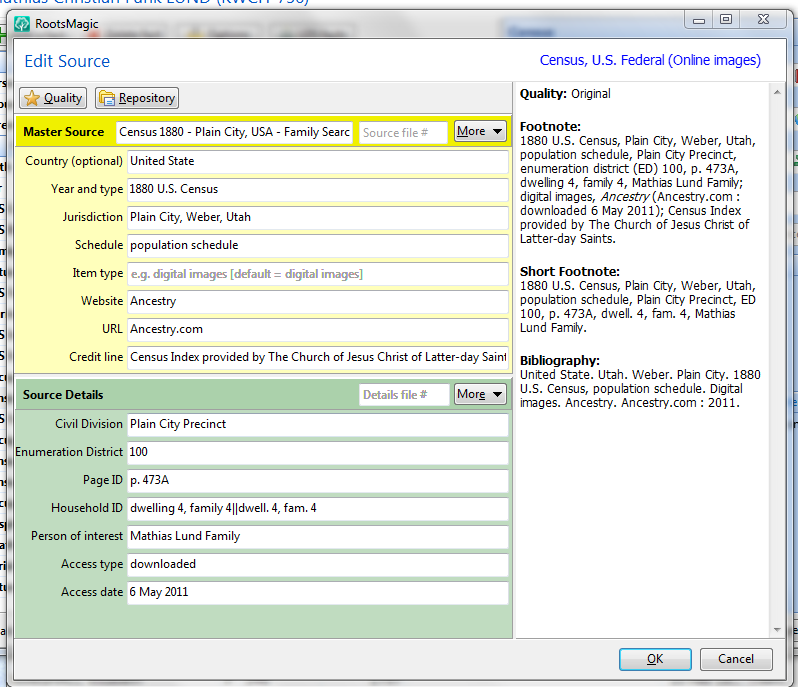
Open the source screen in Roots Magic 4. I used the "footnote" version of the source citation (on the right). I just highlighted it and copied it so I could paste it later.
Then, when I open the image in Picasa's edit window I add the citation under the comments area. That's the grey bar at the bottom under the image.
Now when I select File>Print I have the option under "Border and Text Options" to add the comment below the image when it prints.
I also added the citation in the windows properties dialog because I want to be sure that it will travel with the image if I ever send it to someone.

Now, another thing I can do with this file is save it as a pdf. This makes it really easy to share without having to print. I use cutePDF as the "printer". If you install this program, then cutePDF shows up as a printer option. Then save your file with whatever name you want. Here's the example of Mathias Lund's 1880 Census for you to check out.

This makes it really easy to share documents and make sure the sources go with them.

03 June 2011

Utah State Archives

Wow! Have you used this site yet? It's amazing! I was looking for Death Certificates for ancestors from Plain City, Weber Co., Utah, United States so I checked out the Weber County Health Dept. They only have records from the last 50 years and they cost $16 each! But, they told me that the older records were at the Utah State Archives...and guess what...they have an amazing website!

There are a ton of records online! For Death Certificates they have 1904-1958 indexed online with images. Some older ones are in microfilm, indexed online, but you have to go to the archives to see them...I'll plan on doing that later. For now, I decided to find all the online images. Here's how I found 53 Death Certificates in about 1 hour!

Step 1. Generate report. In Roots Magic this is really easy. I created a list of Deaths in Utah between 1904 and 1958. I made sure to include spouses because the female's Death Certificates are under their married name.

Step 2. Search. In the right menu from the home page select "Research" then "Research Guides". Choose the link to the Death Index for 1904-1958. You can search by name or Date. The date search was really helpful if the spelling was off. Using these search options I was able to find all but 5 records. I'll have to do some more digging to see if the names or dates are wrong...or maybe they didn't die in Utah!


Here's my search for Anderson, Oscar. His name is actually Oscar Alfred Anderson, but I didn't know if the middle name would be on the certificate. There he is:

Then select the name and you'll get to the List of names that match.
Be sure to write down the Entry and Series number for citation purposes. The series for all these records was 81448, but each entry had a different number. I wrote those on my printed report.

Step 3. Download and Name the File. When you select the name from the list you'll go to the specific document page. I just right-clicked on the image and selected "save link as..." {Note: DO NOT CHOOSE "save image as..." that saves the teeny tiny image on this page. You want to save the BIG image. You could also open the image and save it from there.} I saved mine as "Death Certificate - LastName, FirstName". That way it was ready to be filed in my source folders.

Step 4. Add to Database and File. At some point I will go through each file and add the information and citations to my database. That will be a longer process. For now, I'll just add them to my "to file" folder and let them hang out there for a while.

Additional Awesomeness:
At the top of the windows there is a "Name Search" box. If you use this instead you'll see ALL THE RECORDS for that name! Awesome! In this case I found a Brand book that included Elijah Swainston's brand for his cattle. Amazing! I'll have to go back and check that out later.

Finally, here's what I accomplished in about 1 hour:
That's right - 53 Death Certificates, one Brand Book page, and 1 citation file (with the basic info so I can cite all these files later, when I'm ready to it later).

Check out the Utah State Archives for yourself. You won't be disappointed!

02 June 2011

Organization and Filing - Soft Copy

 I'm really trying to go as digital as possible with my genealogy research, for various reasons. First, it will save a tree. Second, Although its easy to find my hard copy files now that they are organized, I think its faster to search for digital files on my hard drive. Third, I don't have to keep going back to the original documents and risk damaging them. I can just deal with my digital copy. So, how do I organize them?

First, I use Dropbox. This is great to use because it not only stores all the files on my hard drive (the "My Dropbox" file is under "My Documents") but also in the "cloud". This means I can access this file from anywhere in the world if I have internet access. So, I could take my laptop to the Family History Library and add files right into my system from there...awesome!
Also, I can sync it with other computers so it will automatically update when I make changes. For example, I've synced my entire dropbox on my laptop. I've also shared my genealogy folders with my Mother-in-law so she can look at them too. Okay, lets talk folder structure:

First, create a Genealogy folder.
  Within that folder create a Database folder, General folder, and Sources folder.

I use my database folder to store backups of my Roots Magic database, Gedcom files I've received or created, and reports I've created.

I use my general folder for exactly that - general genealogy stuff that isn't specific to one person or family. So this is where I put my research logs, videos, and info about researching in Brazil and Denmark. Create as many folders as you need - remember, digital folders are free and don't take up any space (just the documents inside them do).

Now lets talk sources...this is where it gets good.
In my sources folder I create a folder for my tree and Troy's tree. Within each of those folders I create a folder for each Surname (last name) that appears in the respective family trees. I have a lot more names in Troy's tree but that is okay. Now let's take a look at one of those Surname folders.


We have a lot of Lund families in our tree so here's the Lund surname folder. I've named them by last name first then by the husband/wife name. Now, I add any information about these families within the respective folders. Remember from the hard copy filing post to file in the family the doc was created in. For example, my Birth Certificate is in my parent's folder, but my marriage licence is in my husband and my file...because that took place when we were a new family.
 Here's a look inside Troy's G-G-grandparents' folder - Mathias and Pauline Lund. As you can see by the document titles, I can tell exactly what each document is without having to open each one. I've chosen to follow the following naming order:

   Document Type - Person(s) Name - Date - additional info

That way, all like documents bunch together. Some other folders have picture files, so one way I would name it would be:
   Photograph - deMacedo, Deolinda - 1983 - s1
or
   Photograph - deMacedo, Deolinda - 1854 - Identification Card - s2

You could also look at thumbnails of the documents in the file -
 As you can see, it is still important to have the name in order to know what you're looking at. The great thing about this system is that you can find any person's records quickly and easily. You can also search for items based on the title and find it super fast. Try it for yourself.

20 May 2011

Organization and Filing - Hard Copy

In starting my genealogy research journey I have been determined to be organized. I know that the information and amount of paperwork can get overwhelming and I want to not have any problems. Ideally, I should be able to pull out any source material quickly and easily. This requires a really good filing system.
 So, here's what I've done. I bought a file box with a lid on it to keep all my genealogy files in. There are two hanging folders, one for Troy's tree and one for mine. Then, within each hanging folder is a folder for each family. I've sorted these alphabetically by husband's name (last name first), then wife next, including their years because there are some sons with the father's name. So for example, one label might say:
MILLS, Stephen (1799-1874)
   m. TRIGG, Sara (1799-1874)
Within each of these manilla folders I can file documents or printouts that relate to that family group (parents and children). I also included a Family Group Record within each file. I'm not sure that I really need that, since I have it all in my database. Plus, I keep adding new things and changing what I know so I would rather not reprint it every time.
Some of what I've read and listened to suggests giving each paper within the file a number and adding that to your database. So far, I figure that I can look through one manilla folder without much trouble and find what I want. Maybe as I keep going and collecting more documents I'll need to do that.

Here's one question I had: Since I am a child of my father and a wife of my husband, where do I put my own documents? Answer - file the document in the file where the person belongs at the time the document was made.

For example, my birth certificate is filed in my Father's folder because I was a member of his family when I was born. Anything that happened on or after 9 Aug 2003 (my wedding date) will be filed in my Husband's folder because now we are a new family. Easy!

How do you keep track of all your papers? Next time I'll show you what I do with my digital files.